
Table of Contents
- Security Architecture
- Authentication (XSUAA)
- Authorization & Roles
- API & Transport Security
- Secret Management
- Transaction Signing Security
- Input Validation
- Audit Trail
- Production Security Checklist
Security Architecture
Design Principles
- Private key isolation — The server NEVER handles, stores, or has access to private keys. All signing is external.
- Defense in depth — Multiple independent layers: authentication, authorization, input validation, transport encryption, audit logging.
- Least privilege — Role-based access restricts operations to authorized scopes.
- Fail-secure — Invalid/expired requests and missing auth result in explicit rejection.
Security Layers
Layer 1: Transport Security (TLS/HTTPS)
Layer 2: SAP AppRouter (Reverse Proxy + CSRF)
Layer 3: XSUAA Authentication (JWT Validation)
Layer 4: CDS Authorization (@requires + Scopes)
Layer 5: Input Validation (validators.ts + const.ts limits)
Layer 6: Transaction Integrity (Signature Verification + Body Hash Matching)
Layer 7: Audit Trail (SigningRequests + SignatureVerifications + TransactionSubmissions)
Service Separation
| Service | Purpose | Risk Profile |
|---|---|---|
CardanoODataService | Read-only blockchain queries | Low — no state mutation |
CardanoTransactionService | Transaction building, signing, submission | Medium — involves funds movement preparation |
CardanoSigningService | Transaction signing | High — involves private key operations |
This enables independent security policies per service.
Authentication (XSUAA)
ODATANO uses SAP BTP’s XSUAA for production authentication. In development, auth is disabled for local testing.
Profile Configuration
{
  "cds": {
    "requires": {
      "[production]": {
        "db": { "kind": "hana" },
        "auth": "xsuaa"
      }
    }
  }
}- Development (
cds watch): No authentication, all endpoints open. - Production (
[production]profile): XSUAA enforced, every request needs a valid JWT.
xs-security.json
{
  "xsappname": "odatano",
  "tenant-mode": "dedicated",
  "scopes": [
    { "name": "$XSAPPNAME.BlockchainRead", "description": "Read blockchain data" },
    { "name": "$XSAPPNAME.TransactionBuild", "description": "Build unsigned transactions" },
    { "name": "$XSAPPNAME.TransactionSubmit", "description": "Submit signed transactions" },
    { "name": "$XSAPPNAME.SigningManage", "description": "Create/manage signing requests" },
    { "name": "$XSAPPNAME.Admin", "description": "Full administrative access" }
  ],
  "role-templates": [
    {
      "name": "BlockchainViewer",
      "description": "Read-only access",
      "scope-references": ["$XSAPPNAME.BlockchainRead"]
    },
    {
      "name": "TransactionOperator",
      "description": "Build and submit transactions",
      "scope-references": [
        "$XSAPPNAME.BlockchainRead", "$XSAPPNAME.TransactionBuild",
        "$XSAPPNAME.TransactionSubmit", "$XSAPPNAME.SigningManage"
      ]
    },
    {
      "name": "Administrator",
      "description": "Full access",
      "scope-references": [
        "$XSAPPNAME.BlockchainRead", "$XSAPPNAME.TransactionBuild",
        "$XSAPPNAME.TransactionSubmit", "$XSAPPNAME.SigningManage", "$XSAPPNAME.Admin"
      ]
    }
  ]
}
Setup on BTP
cf create-service xsuaa application odatano-uaa -c xs-security.json
cf bind-service odatano odatano-uaa
Authorization & Roles
SAP CAP provides declarative authorization via @requires annotations in CDS.
CDS Annotations
// Read-only service — single scope
service CardanoODataService @(requires: 'BlockchainRead') { ... }

// Transaction service — fine-grained per action
service CardanoTransactionService {
    action BuildSimpleAdaTransaction(...)      @(requires: 'TransactionBuild');
    action SubmitTransaction(...)              @(requires: 'TransactionSubmit');
    action CreateSigningRequest(...)           @(requires: 'SigningManage');
    action VerifySignature(...)                @(requires: 'SigningManage');
}
BTP Role Collections
| Role Collection | Role Template | Intended Users |
|---|---|---|
| ODATANO Viewer | BlockchainViewer | Analysts, dashboards, monitoring |
| ODATANO Operator | TransactionOperator | Application backends, dApp frontends |
| ODATANO Admin | Administrator | Platform administrators |
Create role collections in the SAP BTP Cockpit and assign them to users.
API & Transport Security
TLS/HTTPS
All production traffic must use TLS. SAP BTP provides automatic TLS termination. For Docker, configure a reverse proxy (NGINX, HAProxy) for TLS.
AppRouter as Reverse Proxy
Internet --> AppRouter (auth + CSRF) --> CAP Server (internal only)The AppRouter provides TLS termination, JWT validation, CSRF protection, and session management. The CAP server should NOT be directly internet-accessible.
CSRF Protection
Enabled in xs-app.json routes via "csrfProtection": true. Clients must:
- Fetch token via
GETwithX-CSRF-Token: Fetchheader - Include token in
X-CSRF-Tokenheader on state-changing requests (POST/PUT/DELETE)
CORS
Restrict allowed origins in production (no wildcards):
{
  "cors": {
    "allowedOrigins": [{ "host": "your-domain.com" }],
    "allowedMethods": ["GET", "POST", "OPTIONS"],
    "allowedHeaders": ["Authorization", "Content-Type", "X-CSRF-Token"]
  }
}
Recommended Security Headers
| Header | Value |
|---|---|
Content-Security-Policy | default-src 'self'; script-src 'self' 'unsafe-inline'; ... |
X-Content-Type-Options | nosniff |
X-Frame-Options | SAMEORIGIN |
Strict-Transport-Security | max-age=31536000; includeSubDomains |
Secret Management
Sensitive Variables
| Variable | Sensitivity | Notes |
|---|---|---|
BLOCKFROST_API_KEY | High | Grants API access, counts toward quota |
KOIOS_API_KEY | Medium | Free tier available without key too |
OGMIOS_URL | Medium | Exposes local node endpoint |
HSM_PIN | Critical | PKCS#11 authentication |
Best Practices
- Never commit secrets to version control
.gitignoremust include:.env,*.skey,*.vkey,*.pem,credentials*.json- Local dev: Use
.envfiles - BTP Production: Use SAP Credential Store or User-Provided Services:
cf create-user-provided-service odatano-secrets -p '{
  "BLOCKFROST_API_KEY": "your-production-key",
  "KOIOS_API_KEY": "your-koios-key"
}'
cf bind-service odatano odatano-secrets
API Key Rotation
Rotate keys every 90 days. With multi-backend failover, rotate without downtime:
- Rotate Blockfrost key → Koios handles requests during restart
- Rotate Koios key → Blockfrost handles requests during restart
Transaction Signing Security
This is the most critical security boundary. Private keys NEVER touch the server.
External Signing Architecture
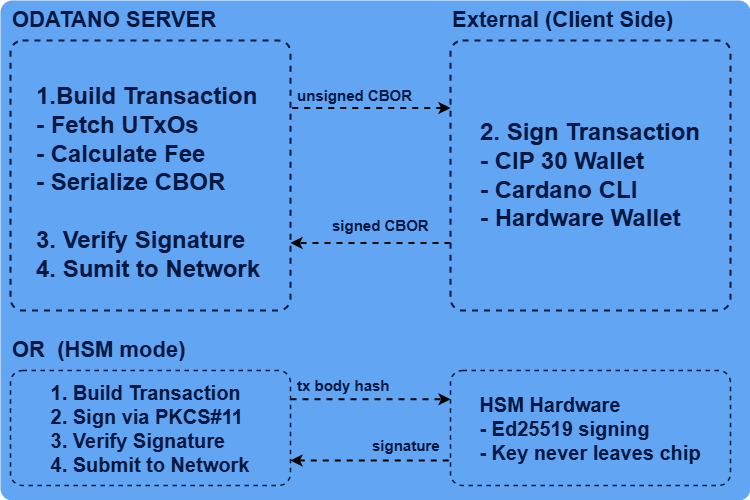
The server only sees: unsigned CBOR, signed CBOR (public witnesses, NOT keys), and transaction body hashes.
Signing Methods
| Method | Key Location | Security Level | Use Case |
|---|---|---|---|
| CIP-30 Browser Wallet | Browser extension | Very High | Web dApps, Fiori apps |
| Cardano CLI | File system (.skey) | High | Backend automation |
| Hardware Wallet | Dedicated device | Maximum | High-value transactions |
| HSM (PKCS#11) | HSM chip | Maximum | Enterprise server-side automation |
For signing code examples, see Transaction Workflow.
HSM (PKCS#11) Integration
ODATANO supports server-side signing via PKCS#11-compatible HSMs.
Configuration:
HSM_ENABLED=true
HSM_PKCS11_MODULE=/usr/lib/pkcs11/yubihsm_pkcs11.so
HSM_SLOT=0
HSM_PIN=0001password          # Use credential store in production!
HSM_KEY_LABEL=cardano-signing-key
HSM_KEY_ID=0x0001
Security properties: Key generated inside HSM with CKA_EXTRACTABLE=false, signing via CKM_EDDSA (Ed25519), PIN-based session auth. HSM failure is non-fatal — app starts without HSM, other signing methods still work.
Verify HSM status:
curl -X POST http://localhost:4004/odata/v4/cardano-sign/GetHsmStatus \
  -H "Content-Type: application/json" -d '{}'
Verification Checks
- CBOR parsing — Valid, parseable CBOR
- Body hash matching — Detects tampering between build and sign
- Witness presence — At least one VKey witness present
- Required signers — Specific key hashes present if required
- Ed25519 verification — Cryptographic signature check per witness
Signing Request TTL
Signing requests expire after 30 minutes (default). Expired requests are rejected even with valid signatures, preventing replay attacks with stale UTxO data.
Input Validation
All inputs are validated before processing via srv/utils/validators.ts with limits from srv/utils/const.ts.
Validators
| Validator | Format | Purpose |
|---|---|---|
isTxHash(s) | 64 hex chars | Transaction/block hashes |
isValidBech32Address(s) | Bech32 addr/addr_test | Payment addresses (network-aware) |
isValidBech32StakeAddress(s) | Bech32 stake/stake_test | Stake addresses |
isValidPoolId(s) | Bech32 pool, 28-byte payload | Stake pool IDs |
isValidDrepId(s) | Bech32 drep, 29-byte payload | DRep IDs |
isAssetUnit(s) | 56-192 hex chars | Native asset identifiers |
isValidCbor(s) | Even-length hex | Transaction CBOR |
validateTransactionInputs() | Composite | Multi-field validation |
validateJsonWithLimits() | JSON + complexity | DoS prevention |
JSON Complexity Limits (DoS Prevention)
| Limit | Value | Purpose |
|---|---|---|
| Max JSON size | 1 MB | Prevents memory exhaustion |
| Max nesting depth | 10 | Prevents stack overflow |
| Max object keys | 100 | Prevents hash collision attacks |
| Max array length | 1,000 | Prevents excessive iteration |
| Max string length | 65,536 | Prevents oversized values |
Network-Aware Address Validation
Addresses are validated against the configured NETWORK. A preview address (addr_test1...) is rejected on mainnet, and vice versa.
Audit Trail
ODATANO records every step of the transaction lifecycle via OData-queryable entities.
Tracked Entities
| Entity | Records | Key Fields |
|---|---|---|
TransactionBuilds | Every build request | senderAddress, fee, unsignedTxCbor, txBodyHash |
SigningRequests | Signing lifecycle | status (pending→verified→submitted), signerType, hsmKeyId, expiresAt |
SignatureVerifications | Every verification attempt | isValid, witnessCount, signerKeyHashes, errorMessage |
TransactionSubmissions | Every submission attempt | txHash, status, errorCode, retryCount |
Querying
# Signing requests for an address
POST /odata/v4/cardano-transaction/GetSigningRequestsByAddress
{"address": "addr_test1qq..."}

# Filtered queries with OData
GET /odata/v4/cardano-transaction/SigningRequests
    ?$filter=status eq 'verified'&$orderby=createdAt desc&$expand=verifications,build

# Failed submissions
GET /odata/v4/cardano-transaction/TransactionSubmissions
    ?$filter=status eq 'failed'
References
- SAP CAP Security Guide
- SAP XSUAA Documentation
- Transaction Workflow — Signing methods and code examples
- Developer Guide — Architecture reference
- CIP-30 Cardano Wallet API